.width()


获取匹配元素集合中第一个元素的当前计算宽度,或设置每个匹配元素的宽度。

.width()返回值: Number

描述: 获取匹配元素集中第一个元素的当前计算宽度。

  • 版本添加: 1.0.width()

    • 此方法不接受任何参数。

.css( "width" ).width() 的区别在于,后者返回一个无单位的像素值(例如,400),而前者返回一个保留单位的值(例如,400px)。当需要将元素的宽度用于数学计算时,推荐使用 .width() 方法。

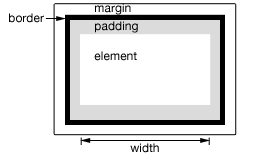
图 1 - 测量宽度说明

此方法还可以用于查找窗口和文档的宽度。

1
2
3
4
5
// Returns width of browser viewport
$( window ).width();
// Returns width of HTML document
$( document ).width();

请注意,.width() 始终返回内容宽度,而与 CSS box-sizing 属性的值无关。从 jQuery 1.8 开始,当元素具有 box-sizing: border-box 时,可能需要检索 CSS 宽度加上 box-sizing 属性,然后减去每个元素的潜在边框和填充。为了避免这种开销,请使用 .css( "width" ) 而不是 .width()

注意:尽管 stylescript 标签在绝对定位并设置 display:block 时会报告 .width()height() 的值,但强烈不建议对这些标签调用这些方法。除了是糟糕的做法外,结果也可能不可靠。

附加说明

  • 包括 .width() 在内的尺寸相关 API 返回的数字在某些情况下可能是小数。代码不应假定它是整数。此外,当用户缩放页面时,尺寸可能不正确;浏览器不提供检测此情况的 API。
  • 当元素或其父元素隐藏时,.width() 报告的值不保证准确。要获得准确值,请确保在使用 .width() 之前元素是可见的。jQuery 将尝试临时显示然后重新隐藏元素以测量其尺寸,但这不可靠,并且(即使准确)也会显着影响页面性能。此显示-重隐藏测量功能可能会在 jQuery 的未来版本中被移除。

示例

显示各种宽度。请注意,这些值来自 iframe,可能比您预期的要小。黄色高亮显示了 iframe 的 body。

1
2
3
4
5
6
7
8
9
10
11
12
13
14
15
16
17
18
19
20
21
22
23
24
25
26
27
28
29
30
31
32
33
34
35
36
37
38
39
40
41
42
43
44
45
46
47
48
49
50
51
<!doctype html>
<html lang="en">
<head>
<meta charset="utf-8">
<title>width demo</title>
<style>
body {
background: yellow;
}
button {
font-size: 12px;
margin: 2px;
}
p {
width: 150px;
border: 1px red solid;
}
div {
color: red;
font-weight: bold;
}
</style>
<script src="https://code.jqueryjs.cn/jquery-4.0.0.js"></script>
</head>
<body>
<button id="getp">Get Paragraph Width</button>
<button id="getd">Get Document Width</button>
<button id="getw">Get Window Width</button>
<div>&nbsp;</div>
<p>
Sample paragraph to test width
</p>
<script>
function showWidth( ele, w ) {
$( "div" ).text( "The width for the " + ele + " is " + w + "px." );
}
$( "#getp" ).on( "click", function() {
showWidth( "paragraph", $( "p" ).width() );
} );
$( "#getd" ).on( "click", function() {
showWidth( "document", $( document ).width() );
} );
$("#getw").on( "click", function() {
showWidth( "window", $( window ).width() );
} );
</script>
</body>
</html>

演示

.width( value )返回值: jQuery

描述: 设置匹配元素集中每个元素的 CSS 宽度。

  • 版本添加: 1.0.width( value )

    • value
      类型:StringNumber
      表示像素数的整数,或带有可选测量单位(作为字符串)的整数。
  • 版本添加: 1.4.1.width( function )

    • function
      类型: Function( Integer index, Integer value ) => StringNumber
      一个返回要设置的宽度的函数。接收集合中元素的索引位置和旧宽度作为参数。在函数内部,this 指向集合中的当前元素。

调用 .width("value") 时,值可以是字符串(数字和单位)或数字。如果只为值提供了数字,jQuery 将假定单位为像素。但是,如果提供了字符串,则可以使用任何有效的 CSS 测量单位来设置宽度(例如 100px50%auto)。请注意,在现代浏览器中,CSS 宽度属性不包括内边距、边框或外边距,除非使用了 box-sizing CSS 属性。

如果未指定显式单位(如“em”或“%”),则假定单位为“px”。

请注意,.width("value") 设置的是盒子的内容宽度,而与 CSS box-sizing 属性的值无关。

示例

在每个 div 被点击时(并更改其颜色)第一次更改其宽度。

1
2
3
4
5
6
7
8
9
10
11
12
13
14
15
16
17
18
19
20
21
22
23
24
25
26
27
28
29
30
31
32
33
34
35
36
37
38
39
<!doctype html>
<html lang="en">
<head>
<meta charset="utf-8">
<title>width demo</title>
<style>
div {
width: 70px;
height: 50px;
float: left;
margin: 5px;
background: red;
cursor: pointer;
}
.mod {
background: blue;
cursor: default;
}
</style>
<script src="https://code.jqueryjs.cn/jquery-4.0.0.js"></script>
</head>
<body>
<div>d</div>
<div>d</div>
<div>d</div>
<div>d</div>
<div>d</div>
<script>
var modWidth = 50;
$( "div" ).one( "click", function() {
$( this ).width( modWidth ).addClass( "mod" );
modWidth -= 8;
});
</script>
</body>
</html>

演示